

To access SUAP for the first time you must follow the same steps as for password recovery, which we will explain in more detail below.
Step 1: go to the SUAP page
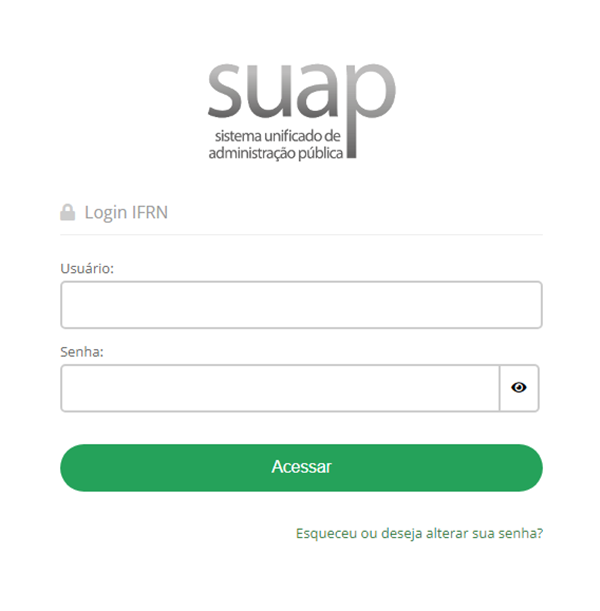
For first access or to recover your SUAP password, you must go to the page suap.ifrn.edu.br .
Then, click on “Esqueceu ou deseja alterar sua senha” which in English would be “You have forgotten your password or wish to change it?”.
Step 2: Fill your personal information
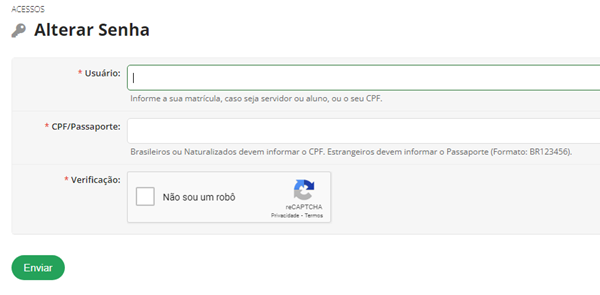
Step 2: Fill in your personal information.
Provide your personal information:
If you are Brazilian, use your registration number to fill in the “Usuário” field and then enter your CPF (Brazilian Individual Taxpayer Registry) number in the “CPF/Passaporte” field.
If you are a foreign citizen, use your passport number in both the “Usuário” and “CPF/Passaporte” fields.
Step 3: change confirmation
You will receive an email from SUAP, confirming the change. Click on the email, and we will send you to the page where you can create a new access key according to the requested rules.
Done! Your password has been successfully changed. Next step!
